Developers of Chicago Engineering Blog
The Claude Code Projects Playbook

Introduction
The landscape of artificial intelligence in software engineering is evolving at a breakneck pace. Where developers once relied on AI simple chat interfaces to paste isolated code snippets and debug basic syntax errors, we have now entered the era of persistent, context-aware AI environments. Anthropic’s continuous updates to its ecosystem—specifically the redesign of Claude Projects alongside command-line tools like Claude Code—mark a fundamental shift in how developers, product managers, and enterprise teams interact with Large Language Models (LLMs).
For modern development teams, the challenge is no longer whether an AI can write functional code; it is whether an AI can understand the intricate architecture, conventions, and business rules of an entire codebase. The redesigned Claude Projects workspace bridges the gap between raw context windows and real-world execution. By allowing teams to bundle documentation, repos, API schemas, and tailored prompt instructions into centralized context hubs, Anthropic is turning generative AI from an auxiliary autocomplete tool into an integrated virtual engineer.
However, leveraging these advanced capabilities effectively requires a clear strategic playbook. Without structure, teams risk blowing through API token budgets, dealing with hallucinated code patterns, or handing off critical security decisions to non-deterministic systems. In this comprehensive playbook, we will break down what changed in the Claude Projects environment, how technical teams can structure their setups, how to manage costs, and precisely where human developers must keep their hands on the wheel.
What Happened
Anthropic has overhauled the Claude Projects interface and ecosystem, transforming it from a basic file-upload folder within the chat UI into a high-powered, collaborative workspace engineered for complex, end-to-end tasks. This redesign addresses one of the most frustrating bottlenecks in developer workflows: context fragmentation. Previously, starting a new chat meant re-explaining project guidelines, re-uploading configuration files, and repeatedly setting background constraints.
The refreshed Projects workspace serves as an anchor for team-wide knowledge. Users can now upload massive documentation suites, repository structures, design systems, and database schemas directly into a shared project environment. Every interaction within that project automatically inherits this high-density context, backed by Anthropic's flagship models like Claude 3.5 Sonnet and Claude 3.7 Sonnet. Furthermore, this UI enhancement aligns with Anthropic’s broader developer push, including terminal-native tools like Claude Code, which bring this deep context awareness directly into local command-line development environments.
This update represents a strategic pivot toward contextual persistence and agentic workflows. Rather than treating AI interactions as disposable single-turn conversations, Claude Projects establishes long-term memory banks for software projects. Teams can create dedicated workspaces for specific microservices, legacy code refactoring initiatives, or frontend design system maintenance, allowing multiple team members to collaborate with an AI that possesses identical, standardized knowledge of the project's state.
Key Details
Under the hood, the redesigned Claude Projects system leverages several technical breakthroughs and architectural choices that differentiate it from generic chat platforms. At its core is Anthropic’s dynamic context utilization, capable of processing hundreds of thousands of tokens of project documentation without suffering from memory degradation or context decay.
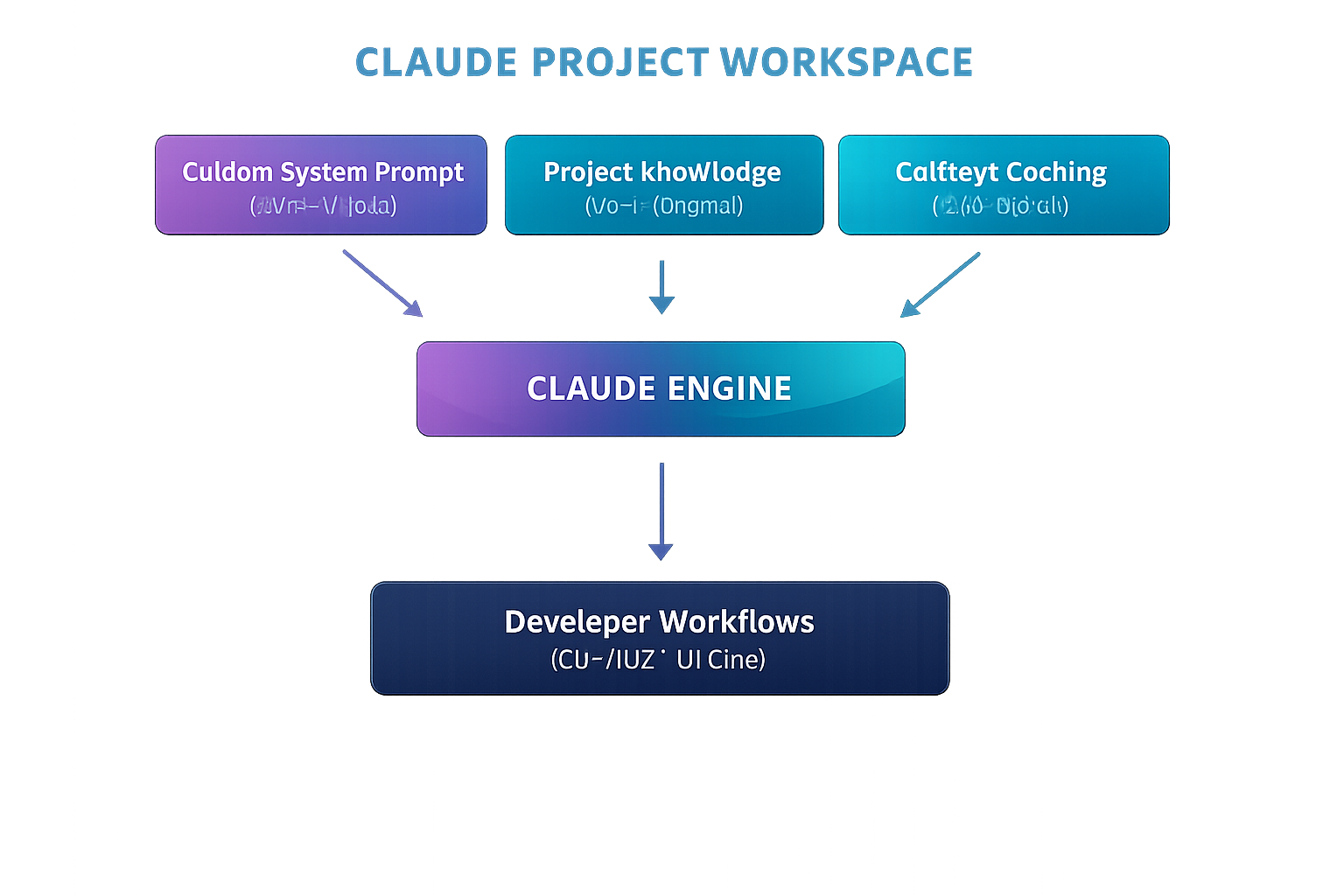
View ASCII source
+------------------------------------------------------------------------+
|                         CLAUDE PROJECT WORKSPACE                       |
|                                                                        |
|  +--------------------+  +-------------------+  +-------------------+  |
|  | Custom System Prompt|  | Project Knowledge |  |  Context Caching  |  |
|  | (Style & Rules)    |  | (Docs, Schemas)   |  |  (Cost Saver)     |  |
|  +---------+----------+  +---------+---------+  +---------+---------+  |
|            |                       |                      |            |
|            +-------------------+   |   +------------------+            |
|                                v   v   v                               |
|                         +-----------------+                            |
|                         |  CLAUDE ENGINE  |                            |
|                         +--------+--------+                            |
|                                  |                                     |
|                                  v                                     |
|                      +------------------------+                        |
|                      | Developer Workflows    |                        |
|                      | (CLI / IDE / UI Chat)  |                        |
|                      +------------------------+                        |
+------------------------------------------------------------------------+
Here are the critical technical details powering the ecosystem:
- Context Caching Integration: One of the most significant engineering enhancements behind modern Claude workflows is Context Caching. Because project files, dependency maps, and coding guidelines remain relatively static across multiple prompts, Anthropic’s architecture caches these large blocks of tokens on their servers. This reduces API response latency by up to 80% and slashes token costs for repeated queries by up to 90%, making long-context project interactions financially viable at scale.
- Custom Instructions & System Prompts: Projects allow teams to define project-level custom instructions that override or supplement default model behavior. Developers can enforce strict coding rules (e.g., "Always use TypeScript strict mode," "Follow functional programming paradigms," or "Use Tailwind CSS for styling and avoid inline CSS").
- Artifacts & Interactive Previews: The UI seamlessly integrates with Claude’s Artifacts feature, enabling the real-time rendering of code, vector graphics, React UI components, and architectural diagrams in a side-by-side split screen. This allows frontend developers to preview code changes visually before pushing them to local git repositories.
- Tier Availability & Enterprise Controls: Claude Projects is structured for Pro, Team, and Enterprise account tiers. Enterprise plans add crucial data privacy guardrails, ensuring that zero customer data, project knowledge files, or proprietary code uploaded to Projects are used to train Anthropic’s foundation models.
Impact on the AI Industry
The realignment of Claude Projects directly impacts the broader competitive landscape of AI-assisted software development, setting up a fierce battle between Anthropic, OpenAI, GitHub, and specialized AI IDE startups like Cursor and Windsurf. While tools like GitHub Copilot traditionally focused on inline code completion, Anthropic is doubling down on high-context reasoning and holistic software design.
This shift signals the end of simple, isolated text prompts as the primary mode of developer interaction. The industry is moving rapidly toward agentic workflows—systems capable of analyzing entire file trees, executing multi-step reasoning, writing unit tests, and iteratively debugging errors. By combining persistent web-based Projects with CLI-based tools, Anthropic is challenging developer environments directly. Instead of forcing developers into a single proprietary editor, they are embedding intelligent context layers across both browser interfaces and native developer terminals.

View ASCII source
+------------------+----------------------------------+----------------------------------+
| Feature          | Claude Projects                  | Traditional AI Coding Tools      |
+------------------+----------------------------------+----------------------------------+
| Context Memory   | Persistent across entire project | Session-based / Disappears on clear
| Architecture     | High-density multi-file uploads  | Limited file snippet attachments |
| Cost Efficiency  | Up to 90% savings via Caching   | Full token reprocessing per prompt|
| Workflow Target  | Architectural & Full-Stack       | Inline code completion           |
+------------------+----------------------------------+----------------------------------+
Furthermore, this development changes how companies evaluate AI total cost of ownership (TCO). By utilizing intelligent caching mechanisms within persistent project environments, Anthropic has drastically lowered the cost-per-query for deep architectural context. This forces competitor models to optimize their pricing and caching architectures, accelerating the democratization of enterprise-grade AI automation across SMBs and mid-market software companies.
What Developers and Businesses Should Know
To maximize return on investment from Claude Projects, engineering managers and developers must adopt a structured playbook. Treating a Project workspace like a dump folder for random text files will result in cluttered contexts and confused AI responses. Here is how to strategically set up, delegate to, and maintain your Claude Projects.
1. How to Set Up a High-Performance Project
- Curate the Knowledge Base: Do not upload your entire
node_modulesor thousands of lines of raw compiled code. Instead, upload high-value context: core database schemas, API specification files (openapi.jsonor GraphQL definitions), architectural design records (ADRs), and internal style guides. - Standardize the System Prompt: Use the Custom Instructions field to establish rigid ground rules. Define target software versions (e.g., "Target Node.js v20, Next.js 14 App Router"), preferred testing frameworks (e.g., "Write all tests using Vitest and React Testing Library"), and security practices (e.g., "Never write inline SQL strings; always use our Prisma ORM interface").
2. What to Hand Off to Claude
Claude Projects excels at tasks that require broad system understanding and repetitive structural patterns. Engineering teams should delegate:
- Boilerplate & Feature Scaffolding: Generating CRUD endpoints, writing TypeScript interface mappings from database models, or scaffolding form validation hooks.
- Legacy Code Migration & Refactoring: Feeding old legacy code modules (e.g., converting Class-based React components to modern functional hooks, or translating Python 2 logic to modern Python 3 typed code) alongside unit tests.
- Automated Test Suite Generation: Uploading a business logic module and requesting exhaustive unit tests, edge-case coverage, and mock data generators.
- Documentation & API Specs: Drafting comprehensive READMEs, updating API documentation based on code updates, or explaining complex logic paths to new developers during onboarding.
3. Decisions That MUST Stay With Human Engineers
While Claude can accelerate implementation, strategic oversight remains non-negotiable. Critical responsibilities that must remain with human developers include:

View ASCII source
+------------------------------------------------------------------------+
|                          HUMAN VS. AI RESPONSIBILITIES                 |
|                                                                        |
|  HUMAN RESPONSIBILITY                     AI DELEGATION                |
|  --------------------                     -------------                |
|  • Security & Auth Boundaries             • Boilerplate & Scaffolding   |
|  • System & Data Architecture             • Unit Test Suite Generation |
|  • Business Logic Rules                   • Refactoring & Code Style   |
|  • Final Pull Request Approval            • Documentation Generation   |
+------------------------------------------------------------------------+
- Security & Authentication Boundaries: Deciding authorization structures, token management, cryptographic implementations, and permissions boundaries. AI models can introduce subtle security flaws if relied upon blindly.
- Core Architectural Boundaries: Designing database schemas, microservice interaction boundaries, and cloud infrastructure layout. The AI should write code within an architecture, not invent the enterprise architecture unilaterally.
- Final Code Review & Quality Assurance: Every line of code generated within a Claude Project must pass through standard CI/CD pipelines, automated security checks, and human code review before reaching production environments.
Future Outlook
Over the next 6 to 12 months, expect the boundaries between web-based project hubs, local IDEs, and cloud CI/CD pipelines to blur entirely. Claude Projects is an early milestone in a longer trajectory toward fully integrated, autonomous AI software agents.
We anticipate Anthropic and its competitors will introduce direct integration capabilities into cloud environments. Imagine a Claude Project that isn't just passive text and documentation, but actively connected to your GitHub repositories via bi-directional sync. When a pull request is opened, project-aware AI agents could automatically review the code against project guidelines, run test pipelines in isolated sandboxes, draft performance analyses, and submit suggested code fixes directly to the branch.
Furthermore, multi-modal project context will expand dramatically. Developers will soon upload interactive Figma design components, system topology diagrams, and network packet traces directly into Claude Projects. The model will natively map UI design tokens to clean code implementations while verifying that backend database architecture matches visual data flow requirements.
Conclusion
The redesigned Claude Projects workspace offers software organizations a powerful framework for scaling developer productivity. By combining deep context persistent knowledge bases, structured project rules, and efficient token caching, Anthropic has provided a practical roadmap for real-world AI integration.
Success with these tools does not come from treating AI as a magic button, but from treating it as a highly capable, context-driven assistant. By carefully curating project knowledge, standardizing system instructions, and maintaining strict human oversight over architecture and security, development teams can dramatically accelerate release velocity without sacrificing software quality.
Build With Developers of Chicago
If this kind of AI capability matters to your product, you need a team that can actually ship it. Developers of Chicago helps startups and enterprises design, build, and deploy AI-powered software — from custom integrations to full-scale automation systems.
- AI Integration & Automation — Explore our AI services
- Custom Software Development — See our services
- Mobile App Development — Build with us
- Start a Project — Book a call
Based in Chicago. Building for clients everywhere.